
Preparing review system for you...
Google Review Generator for Spas
Turn your spa visit into a natural Google review with a few quick details.

Why Google reviews matter for your spa
A Google review for spa visits can highlight treatments, service, and atmosphere. A review generator makes sharing those details easier.
How to use the review generator for your spa
Share a few details about the customer journey, then turn them into a review that is easy to copy and post.

Step 1
Rate your visit
Rate your overall spa experience, from booking and arrival to the treatment, staff service, facilities, and time spent there.

Step 2
Add what stood out
Add tags or notes about massages, facials, treatments, staff, cleanliness, ambience, facilities, comfort, or other details.

Step 3
Generate your review
ReviewBro uses your rating and spa-specific notes to create natural review drafts based on the experience you described.

Step 4
Choose a draft
Review the generated options and choose the draft that best reflects your treatment, service, atmosphere, and overall spa experience.

Step 5
Copy or find your business on Google Maps
Copy your chosen review and post it on Google, or search for your spa on Google Maps to continue to the correct business listing.
How to get more Google reviews for your spas
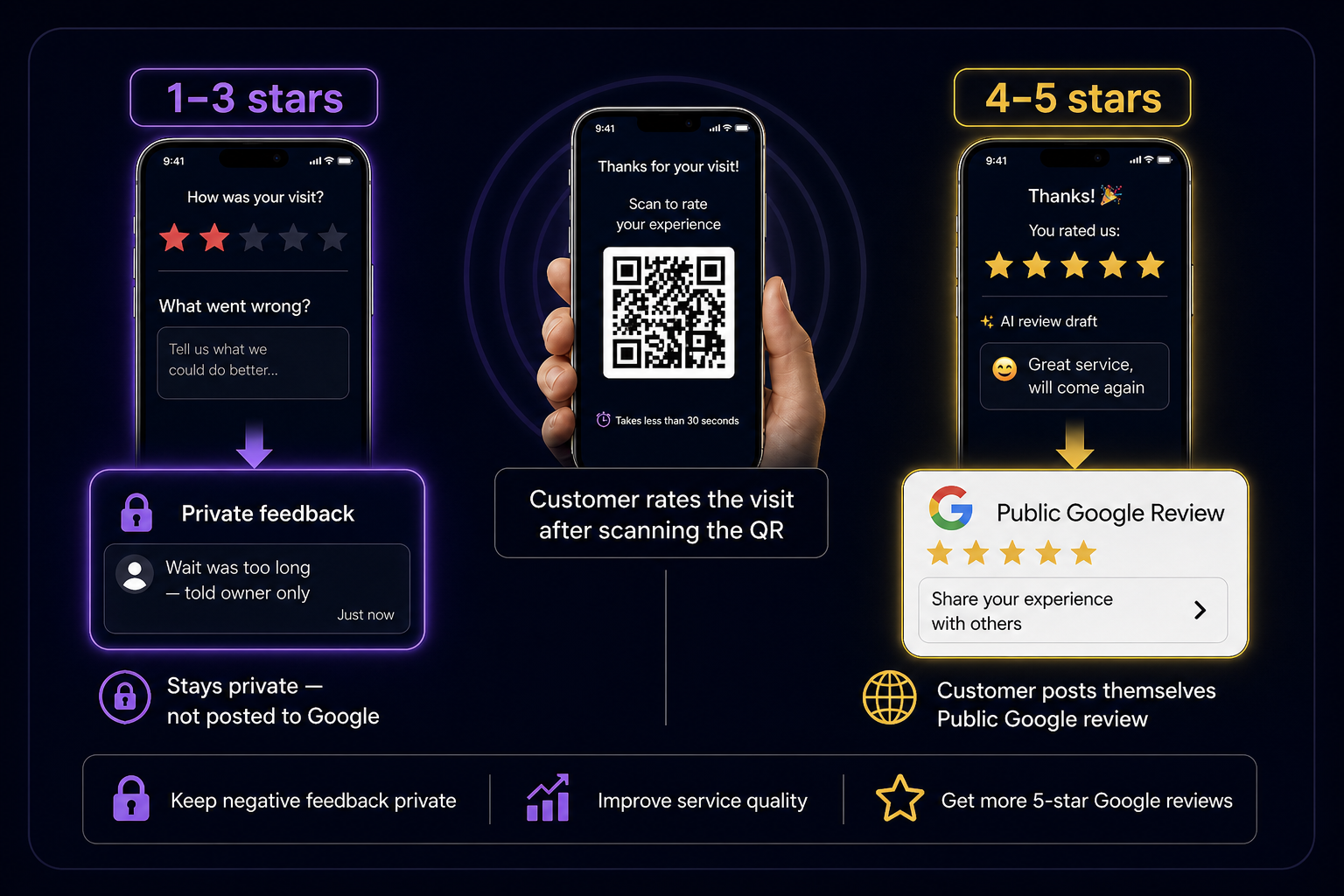
Customers scan a QR code, rate their visit, and get an AI review draft. They can post it on Google Maps in under a minute.

Scan → rate → pick an AI draft → post on Google Maps
Private feedback before public reviews
Low ratings stay inside ReviewBro so you can improve. Happy spas customers are guided to leave a public Google review.

Setup your business free
Create a free account and get a branded review QR. Turn happy customers into public reviews.
Frequently asked questions
What is a Google review generator for spas?
A Google review generator for spas turns a customer's rating, treatment details, and notes into a review draft they can edit, copy, and post on Google.
What can customers mention in a spa Google review?
Customers can mention treatments, staff service, ambience, cleanliness, facilities, comfort, booking, arrival, and their overall spa experience.
Can ReviewBro be used for different spa treatments?
Yes. ReviewBro can be used for different spa visits, including massages, facials, body treatments, and other services, based on the details provided.
Does ReviewBro post spa reviews to Google automatically?
No. ReviewBro generates review drafts. The customer can copy a draft and post it to the spa's Google Business Profile.
Can customers edit a generated spa review?
Yes. Customers can review and edit a generated draft before copying or posting it, so the final review accurately reflects their experience.
How does the spa review generator work?
The customer rates the visit, adds tags or notes about what stood out, generates drafts, chooses one, and then copies it or finds the spa on Google Maps.
Can customers mention a specific treatment or therapist?
Yes. Customers can add details about a treatment or staff member in their notes and review the generated draft before posting it.
When should a spa ask customers for a Google review?
A spa can invite customers to write a review after a completed visit, such as after their treatment or through a review QR code placed at an appropriate customer touchpoint.
Can a spa use ReviewBro to encourage customer reviews?
Yes. A spa can direct customers to the review generator after their visit, helping them turn their genuine experience into a review they can post on Google.